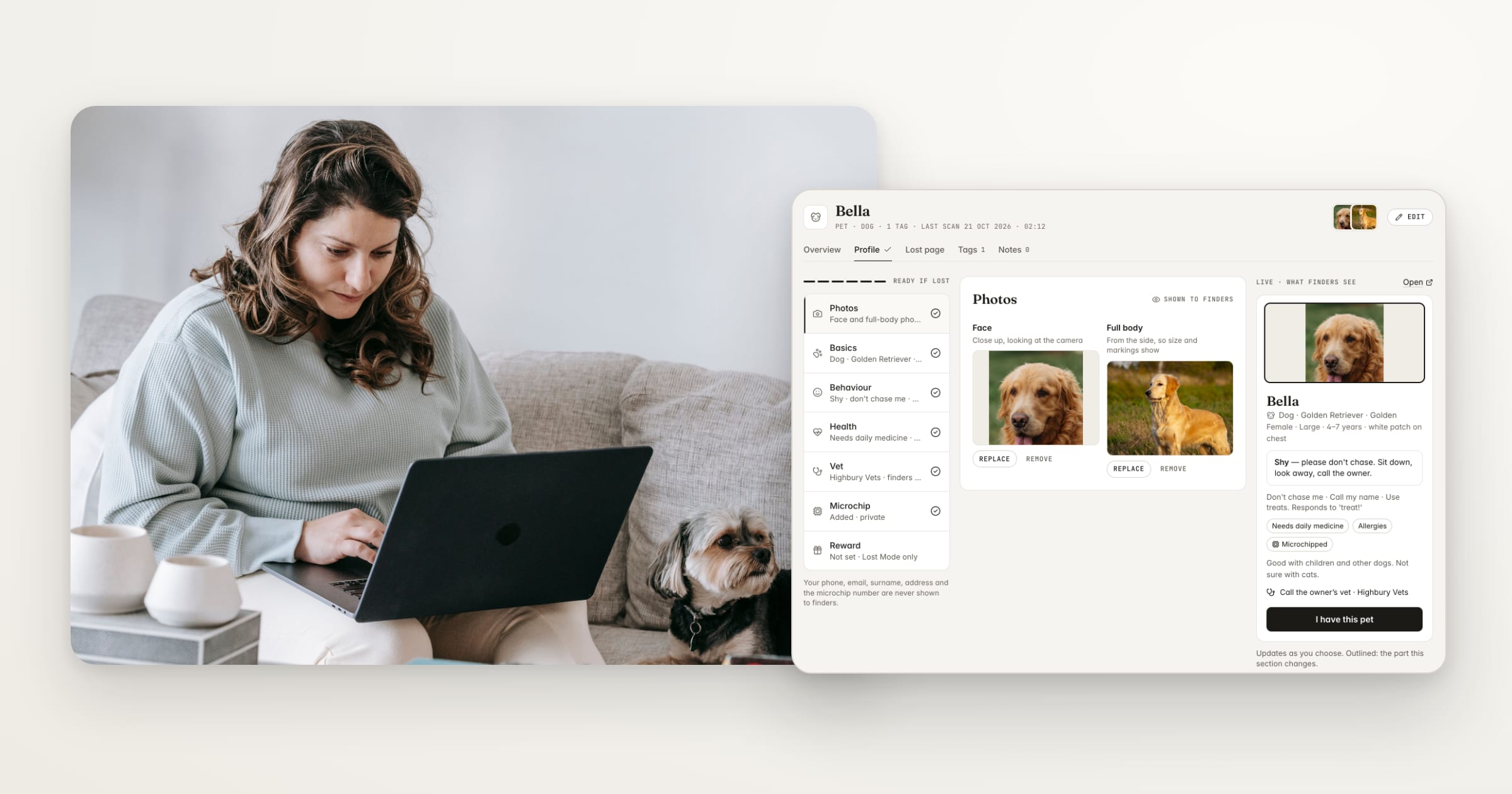
A pet ID profile is the page a stranger sees when they scan your pet’s QR tag. We rebuilt it around one question: what does a person holding a scared, lost dog need in the first 30 seconds? They need to know it is the right dog, how to keep her calm, and how to reach you, without ever seeing your phone number.
So the new MyTags pet profile asks for three essentials first. Everything else is optional.
What is new in the MyTags pet ID profile?
The profile now has one clear goal: Ready to be found. Three essentials get you there, and the app shows plainly which ones are done. There is no score to chase. If something is missing, the profile says Almost ready and lists only what is missing.

What helps a stranger in the first 30 seconds?
A clear face, a calm instruction and a way to reach you. Those are the three essentials:
- A face photo. The finder compares it with the dog in front of them, so they can be sure it is her.
- How she is with strangers. This is the first thing a finder reads. Pick Friendly, Shy, Nervous or May bite when scared, and the finder sees one plain sentence, such as “Shy — please don’t chase. Sit down, look away, call the owner.”
- A linked tag. So the finder can reach you. Your number stays hidden.
A frightened dog often runs from a stranger who rushes in. One line about how to approach her can be the difference between a dog that comes close and a dog that runs into traffic.

Set up your pet's profile in 2 minutes. Your first digital tag is free.
Get your first tag freeWhat should you put on your pet’s ID profile?
Start with the three essentials. Then add what helps a stranger care for your pet until you arrive:
- Face photo, and a full-body photo from the side
- How she is with strangers, and what to do if someone sees her alone
- Breed, colour, markings, age and size, so people can tell her apart
- Health flags, such as “Needs daily medicine” or “Allergies”
- Your vet, with an optional “Call vet” button
- Microchip number (private; finders see only “Microchipped”)
- A reward line, shown only in Lost Mode
This is also the modern answer to “what to put on a dog tag”. Put a QR pet tag without your phone number on the collar, and keep the details in the profile. Do not put your phone number or home address on the collar.
Why does MyTags ask each question?
Each question has its own row, a short “why we ask”, and a label that says who sees the answer: Finders see this, Only in Lost Mode, or Private. You always know what a stranger will read.
Health notes, for example, stay off the page until your pet is in Lost Mode or someone reports she is hurt. The microchip number is never shown.
One detail, to be clear: your vet’s phone number is private and is not shown on your pet’s page. But if you let finders call your vet, the finder’s phone shows the number when it dials, as with any phone call.

How long does it take to set up?
About 2 minutes. When you add a pet in the app, a short first run asks only for the three essentials, one per screen. You can skip any step and come back later.

Does it work on Android, iPad and the web?
Yes. The new pet profile is in the MyTags app, version 2.2.0, on iPhone, iPad, Android phones and Android tablets. On iPad and Android tablets, a live preview of the finder’s page sits next to the form and outlines the line your answer changes.
On the web at web.mytags.io, you edit the same profile, with a live preview of what finders see. The essentials checklist and the 2-minute first run are in the apps.

Download the app for iPhone, iPad or Android.
If she’s ever lost, everything is ready in one tap
The profile is the foundation. If your dog goes missing, turn on Lost Mode and MyTags uses the profile to make everything at once: printable A4 posters, Story and feed images to share, a lost page that collects sightings, and a “home safe” card when she is back. Read how to make a lost dog poster that brings your dog home.
FAQ
What is a pet ID profile?
It is the page a stranger sees when they scan your pet’s QR tag: her photo, how to approach her, and a button to message you. In MyTags you fill it in once, and you choose what finders see.
Does the finder see my phone number?
No. The tag and your pet’s page never show your phone number, email or address. The finder sends a message through MyTags and you reply from the app. The finder does not need an app to scan the tag.
Do I have to fill in every section?
No. Only three things count: a face photo, how your pet is with strangers, and a linked tag. When all three are done, the profile is Ready to be found. Everything else is optional and never counts against you.
Can a finder call my vet?
Only if you turn it on. Your vet’s phone number is private and is not shown on your pet’s page. If you let finders call your vet, the finder’s phone shows the number when it dials, like any call.
Do I have to pay for the pet profile?
No. The pet profile is free, and your first digital tag is free. Physical tags start at ₹349 in the MyTags shop. There is no subscription.
 Your first digital tag is free.Set up your pet's profile in 2 minutes and link a free digital tag. Tags from ₹349 in the shop. No subscription. On iPhone, iPad, Android and the web.Get your first tag free