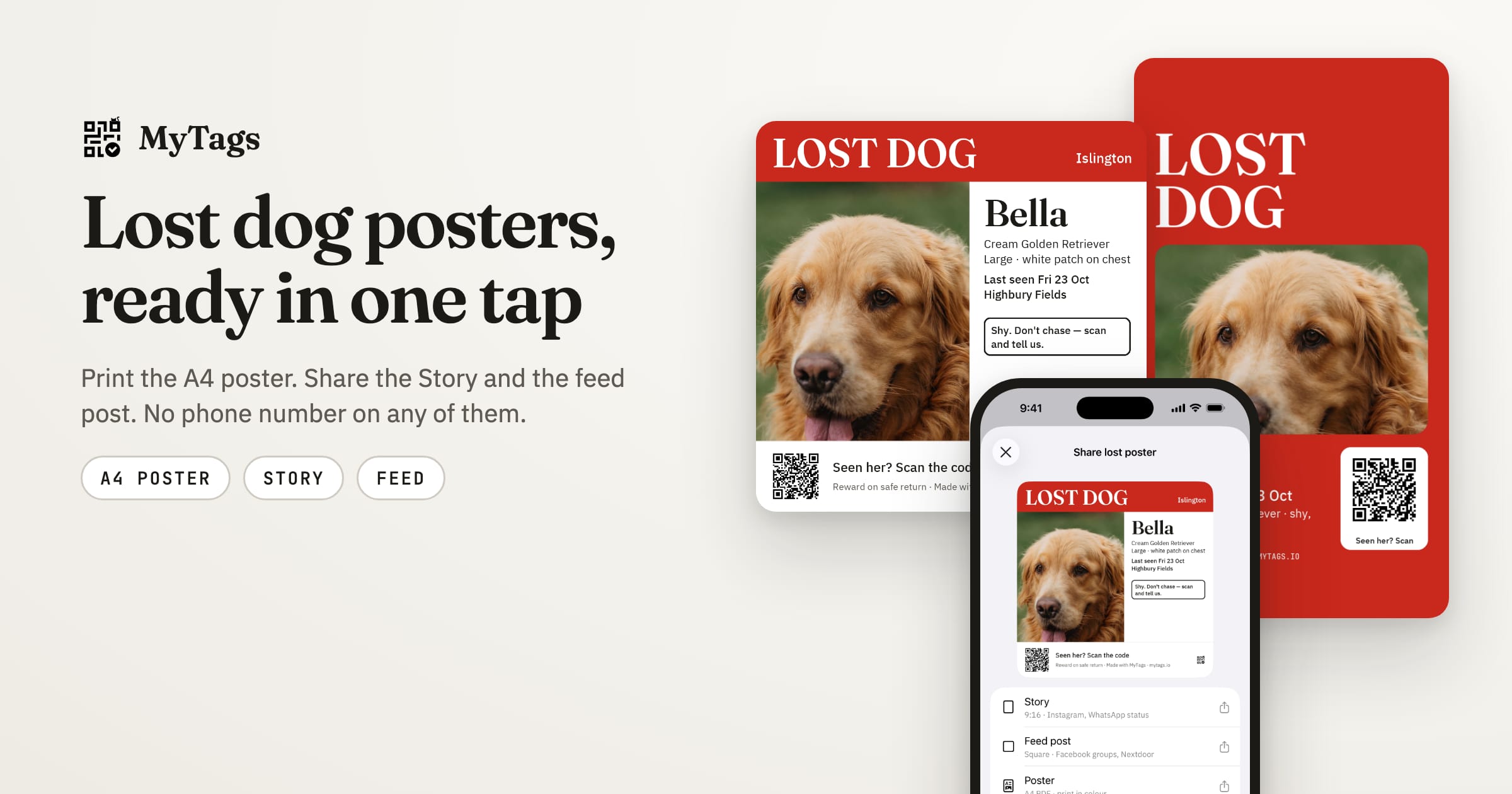
When a dog goes missing, the first hours matter most. Knowing how to make a lost dog poster is not the hard part. The hard part is doing it while you are scared: finding a good photo, writing the details, printing, sharing. That can take an hour you do not have.
With MyTags, you fill in your dog’s profile once, in about 2 minutes. If she is ever lost, one tap makes everything: an A4 poster, a black-and-white poster, a Story image, a square feed post and a lost page with a QR code. None of them shows your phone number.

What to put on a lost dog poster
A good lost dog poster answers three questions in a few seconds: is this the dog I saw, what do I do, and how do I tell the owner. Put these on it:
- A clear face photo, big enough to see from across the road
- “LOST DOG” and her name, in large letters
- The area and date she was last seen
- Breed, colour and size, and any markings
- How to approach her, for example “Shy. Don’t chase — scan and tell us.”
- A reward line, if you offer one
- A way to reach you, without your phone number: a QR code
MyTags fills in every line from your pet’s profile.

Ready-made lost posters in one tap
Turn on Lost Mode, add where she was last seen, and tap Share lost poster. MyTags makes four files at once:
- A4 poster in colour, to print for shops and lamp posts
- A4 poster in black and white, for any printer
- Story image (9:16), for Instagram and WhatsApp status
- Square feed post, for Facebook groups and Nextdoor
Each one has her photo, the last-seen area, the key details and a QR code that reaches you. There is no phone number on any of them.

Make Bella's posters before you ever need them. Set up her profile in 2 minutes. Your first digital tag is free.
Get your first tag freePrint or share in seconds
Download the A4 PDF and print it at home or at a print shop. The black-and-white version prints clearly on any printer. To share, tap the share button and pick WhatsApp, Instagram, Facebook or Nextdoor. Post it in your society and neighbourhood groups first.


A lost page that collects sightings
The QR code on every poster opens your dog’s lost page. Neighbours see her photo, where she was last seen and how to approach her. They tap I’ve seen her or I have her, and you get the message at once.
The page never shows your number. A neighbour’s location is shared only if they choose to share it.

Want to try it? See what a finder sees on our demo lost page. Nothing is sent to anyone.
When she’s home: say thank you
Tap Mark as home safe. MyTags makes a “home safe” card to thank everyone who shared, and the lost page changes to Found — thank you for sharing. Old posters on lamp posts then lead to good news, not to false alarms.

Set it up before you need it
The posters are only as good as the profile behind them. A new profile asks for three essentials first, one per screen, in about 2 minutes:
- A face photo, so a finder can be sure it is her.
- How she is with strangers, the first thing a finder reads.
- A linked tag, so a finder can reach you. Your number stays hidden.
When all three are done, the profile says Ready to be found. Everything else is optional. Each question says why we ask and who sees the answer: finders, only in Lost Mode, or only you. Read more about what to put on your pet’s ID profile.

MyTags works on iPhone, iPad, Android phones and tablets, and on the web at web.mytags.io. The pet profile, Lost Mode and the posters work on all of them. Download the app, and read more about QR pet tags or get a ready-made tag in the MyTags shop.
FAQ
What should I put on a lost dog poster?
A clear face photo, your dog’s name, the area and date she was last seen, breed, colour and size, one line on how to approach her, and a way to reach you. MyTags adds all of these from your pet’s profile, with a QR code instead of your phone number.
Should I put my phone number on a lost dog poster?
You don’t have to. A poster stays up for weeks and anyone can read it. MyTags posters have no phone number. The QR code opens your dog’s lost page, where people tap I’ve seen her or I have her, and the message reaches you through MyTags.
Can I print the poster at home?
Yes. MyTags makes an A4 poster in colour and an A4 poster in black and white for any printer. Download the PDF and print it, or send it to a print shop.
What happens to the posters when my dog is found?
Mark her as home safe. The lost page changes to Found — thank you for sharing, so old posters do not cause false alarms, and you get a home safe card to thank everyone who helped.
How much does it cost?
The pet profile, Lost Mode and the posters are free in MyTags. Your first digital tag is free, and physical tags start at ₹349 in the MyTags shop. There is no subscription.
 Your first digital tag is free.Set up your pet's profile once, and the posters are ready if you ever need them. Tags from ₹349 in the shop. No subscription. On iPhone, iPad, Android and the web.Get your first tag free